“I had separate photos of my parents and kids and turned them into one family picture. Honestly, it came out way more natural than I expected and didn’t have that obvious pasted-together look.”
Sarah M.
Austin, TX
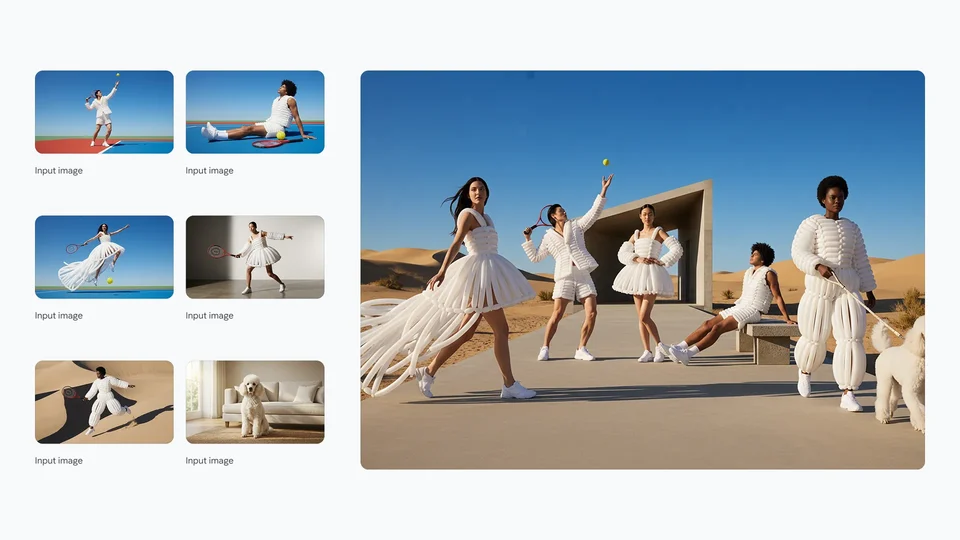
Combine people, products, backgrounds, and any subjects with best‑in‑class AI. Create stunning ads, listings, and social posts in minutes — free trial available.
AI-generated images will appear here
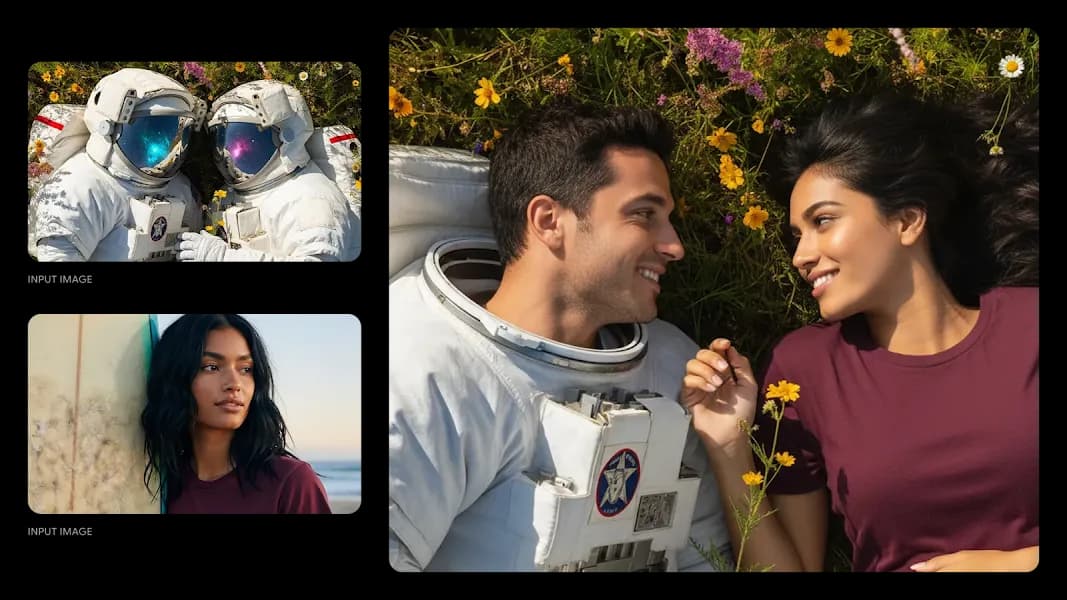
Upload two images to combine, then guide the AI with a prompt to create stunning results.


Prompt: Replace the astronaut on the right with the woman and remove the helmet on the astronaut on the left to show the man's face. The two are looking at each other.
Application: Character replacement / compositing
Family photos, couple shots, fan edits, product images. These are the kinds of results people have been using it for lately.
“I had separate photos of my parents and kids and turned them into one family picture. Honestly, it came out way more natural than I expected and didn’t have that obvious pasted-together look.”
Sarah M.
Austin, TX
“My partner and I barely had any decent photos together, so I used two solo shots and made one for our anniversary invite. It genuinely looked like we’d taken it on the same day.”
Jason K.
Chicago, IL
“I do fan edits all the time, and this was one of the first tools that made a photo with my idol actually look believable. The edges, skin tones, and shadows were much cleaner than usual.”
Mina L.
Los Angeles, CA
“We’ve been using it for product shots when we don’t want to book a full shoot. Drop the product into a scene, tweak the prompt a bit, and you can get something usable really fast.”
Daniel R.
Seattle, WA
“I made a photo of my dog sitting next to my grandparents from separate pictures, and my family loved it. It felt a lot more personal than a standard collage.”
Emily T.
Portland, OR
“We used it to mock up hero images for a small skincare brand. For quick landing page visuals, it’s honestly much faster than organizing a full lifestyle shoot.”
Nora C.
San Diego, CA
“I had separate photos of my parents and kids and turned them into one family picture. Honestly, it came out way more natural than I expected and didn’t have that obvious pasted-together look.”
Sarah M.
Austin, TX
“My partner and I barely had any decent photos together, so I used two solo shots and made one for our anniversary invite. It genuinely looked like we’d taken it on the same day.”
Jason K.
Chicago, IL
“I do fan edits all the time, and this was one of the first tools that made a photo with my idol actually look believable. The edges, skin tones, and shadows were much cleaner than usual.”
Mina L.
Los Angeles, CA
“We’ve been using it for product shots when we don’t want to book a full shoot. Drop the product into a scene, tweak the prompt a bit, and you can get something usable really fast.”
Daniel R.
Seattle, WA
“I made a photo of my dog sitting next to my grandparents from separate pictures, and my family loved it. It felt a lot more personal than a standard collage.”
Emily T.
Portland, OR
“We used it to mock up hero images for a small skincare brand. For quick landing page visuals, it’s honestly much faster than organizing a full lifestyle shoot.”
Nora C.
San Diego, CA
Choose a plan. Free users get watermarked previews. Paid plans unlock watermark-free image downloads.
Free users can generate watermarked previews. Upgrade when you want watermark-free image downloads. Cancel anytime.
Get 10 free credits on sign up
Learn about capabilities, usage, licensing, privacy, and plans. Use AI Image Combiner to naturally blend subjects, products, scenes, and graphics into commercial‑ready visuals.
AI Image Combiner is a generative workflow that blends people, objects, scenes, and graphics into a cohesive visual. With AI Image Combiner you can upload one or more images and it automatically handles cutout, light matching, and edge transitions so the final image looks naturally integrated.
With AI Image Combiner, it's simple: upload your subjects, products, backgrounds, logos, or scenes; describe your idea; then click combine. You can use AI Image Combiner with single images or multiple sources across many scenarios — ads, social posts, listings, presentations, and more.
Yes. AI Image Combiner lets you export transparent PNG and choose from presets for multiple sizes and aspect ratios to fit social media, ads, and storefronts.
In AI Image Combiner, use sharp inputs with consistent lighting, and add style details in your prompt (e.g., natural light, soft shadow, realistic texture). AI Image Combiner optimizes light matching and edge blending.
Yes. You own the generated images from AI Image Combiner and may use them commercially. Please ensure you have rights to your uploaded materials and follow the platform terms.
No. AI Image Combiner doesn't store your images or prompts for training. Uploads are processed only for generation and then discarded.
Yes. AI Image Combiner is mobile‑friendly — uploading and preview are optimized for mobile with drag‑and‑drop, gallery selection, and pinch‑to‑zoom.
AI Image Combiner is great for lifestyle mockups, product visuals, ads, social posts, brand key visuals, quick concepts, and scene replacements — not limited to models and products.
In AI Image Combiner, try cleaner subjects, unify light direction, or add composition hints. You can also refine and re‑combine after generation.
AI Image Combiner is free to try. Paid plans include monthly image generations with higher limits and quality. Upgrade anytime — cancel anytime.